30 Sep 2024
4 min
Immer Ärger mit Bartleby: a flying viewport at Theater Basel
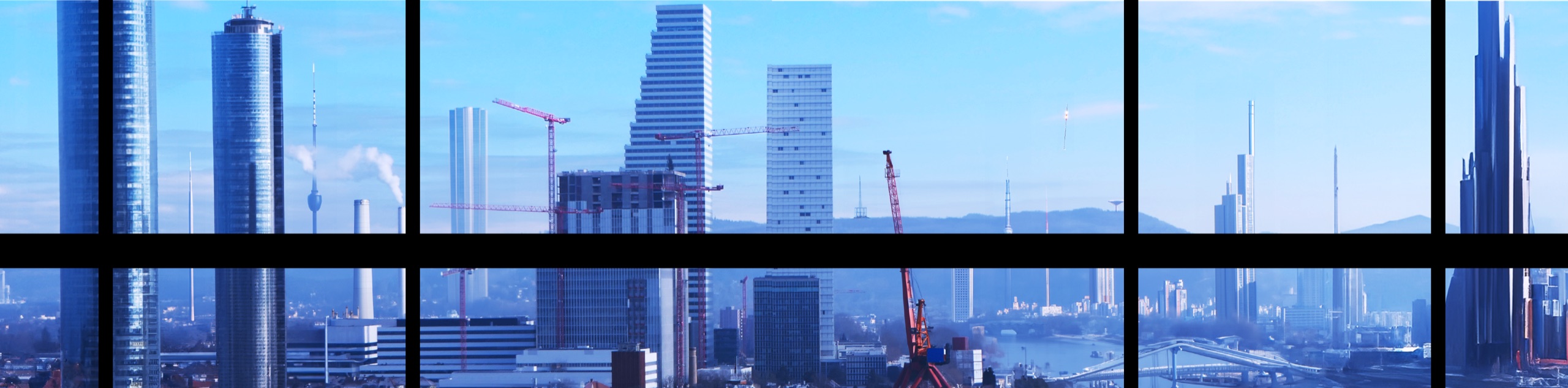
A 180° screen and a rotating stage
For Rocko Schamoni's staging at Theater Basel, the set had two things that needed to talk to each other: a 180-degree screen wrapping around the back of the stage, and a rotating stage element in the centre. The goal was to make the video and the rotation move together so the audience would read the picture as a flying viewport. When the central stage turns, the video moves in the same direction at the same speed.
The frame
Before anything else I built a simple "frame" inside the picture. Two reasons:
- It gave me a reference for the skyscraper view the show needed.
- It defined a dark area at the back where I couldn't project, both because of where the projectors sat and because I didn't want to throw light on the actors standing in the centre.
The frame solved both problems at once. The dark area reads as a wall, not a missing pixel.
Basel in 2032
The base image is a photograph of two well-known towers in Basel. In Photoshop, with the help of AI, I added more skyscrapers around them to push the city into a futuristic 2032 silhouette. The result is a looping cityscape that fits the show's framing without losing the place it belongs to.
Resolution math
In the end I had a looping picture of 7280 × 1080 px for a projection surface of 3640 × 1080 px, including a 200 px overlap for the two projectors. Some resolution was lost to the warping each projector needs.
In After Effects I built a sequence at 3640 × 1080. The 7280 × 1080 image gets placed several times along the x axis so the loop never visibly seams. A null object drives the movement.
I recorded the actual stage rotation during rehearsals and translated that timing into After Effects keyframes, then exported the video.
Two cameras
In the video playback software I set up two cameras at 1920 × 1080 with the right x offset, then warped each output to match the projection surface. That's the whole projection chain.
The grandfather
In the show, a grandfather character appears via a call on the screen. He needed to look like Rocko, the director, but older, holographic, with a clean alpha channel and the ability to react to the actors on stage. I generated him like this:
- Filmed Rocko in front of a neutral background.
- Exported the footage as a PNG sequence.
- Took one frame and ran it through a mobile app that does the aging effect.
- Used the aged frame as a reference in EbSynth, which propagated the aging across every other frame of the sequence.
- Imported the result back into After Effects, removed the background, added a hologram effect.
That gave me the base loop. The same process was repeated for every text part the grandfather speaks, with a still video blended between them so the character can pause and react instead of cutting hard.
Other content
Beyond the cityscape and the grandfather, the show carries advertisements, nature environments, and memes drifting across the screen. A wider front-projection picture is used for the final explosion.